

September 23, 2025

As Fall approaches, SuiteWorld will be here October 6th through 9th in Las Vegas. If you cannot attend in person, there are some online options – check out SuiteWorld OnAir at SuiteWorld 2025 | Las Vegas & On Air | NetSuite.
This month we are going to provide information on NetSuite’s Outlook Connector. Currently, email originating in the NetSuite system can be recorded in the communications tab under a variety of records (Customer, Opportunity, etc). The recently announced NetSuite Outlook Connector will streamline communications for sales, marketing, and operations teams using Outlook and NetSuite’s native CRM by allowing users to associate emails with NetSuite records directly from Outlook.
General Availability of the Connector is expected to be announced shortly after SuiteWorld.
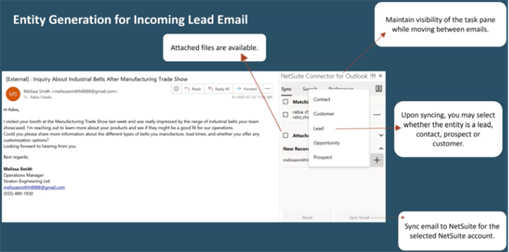
The basic process of using the Outlook Connector is straightforward. Once installed, open an inbound email and click the NetSuite Connector for Outlook located in the apps folder directly in Outlook. Next, log into your NetSuite account and select a record to sync (or if it's a lead, create a new lead). Once the desired information is selected, click sync now and the information updates the appropriate record in NetSuite. Some of the other functions of the Outlook Connector include recognizing existing entities, event syncs, and opportunity creations.
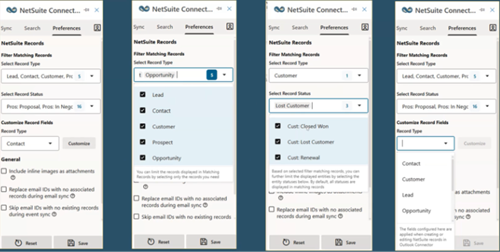
A couple of tips to help more effectively use the Outlook Connector include setting default sync rules as well as setting up a regular sync schedule (i.e. every Monday, Wednesday, and Friday at 4 pm) to ensure that data is kept up to date. Another tip is to confirm the records in NetSuite before saving. This will prevent, or at least minimize, having to go back and change the information in NetSuite after the data is synced. Finally, train staff on the difference between creating records versus updating records for time efficiency.
NetSuite has highlighted several beneficial use-cases for the NetSuite Outlook Connector. One use-case includes creating leads, prospects, opportunities, and customers. Within NetSuite this process can be time consuming and can be prone to data entry errors. With the Outlook Connector, this process can be completed instantly with minimal error. Another beneficial use is being able to sync contacts from existing customers. Instead of having to go to the customer record in NetSuite, you can add the contact by using the Outlook Connector. In the Outlook Connector, select the proper relationship, and then sync it. The customer in NetSuite will be updated with the related contact automatically.
Key reasons to leverage the Outlook Connector include:
- - Save time
- - Reduce manual errors
- - Keep CRM records up to date
- - Improve response times to customers
Taking advantage of this new tool (when available) can help your company reduce the time to convert a lead into a customer.
If you would like more information about SuiteWorld or the Outlook Connector, reach out to your Meridian Business contact or email Meridian at mpower@meridianbusiness.com.